
My own product · Microsoft Store
Bozza
A minimal text and Markdown editor: write in plain text and formatting appears as you type - no asterisks and hashes in the way.
Like a modern notepad - multiple tabs, automatic reopening of your documents and continuous backup - but clean. One click switches back to the raw source, just like a normal code editor. Fully offline: no account, no data collection.
Features
What Bozza can do
- Markdown with hidden markers, or raw source view
- Browser-style tabs, reorderable
- Automatic backup and session restore
- Highlighting for Markdown, HTML, CSS, JavaScript, TypeScript, PHP, Python, SQL and more
- Light and Dark themes
- Text zoom with Ctrl+wheel
- Print and preview
- Interface in 8 languages, detects your system language
- Fully offline, no account, no data collection
Interface
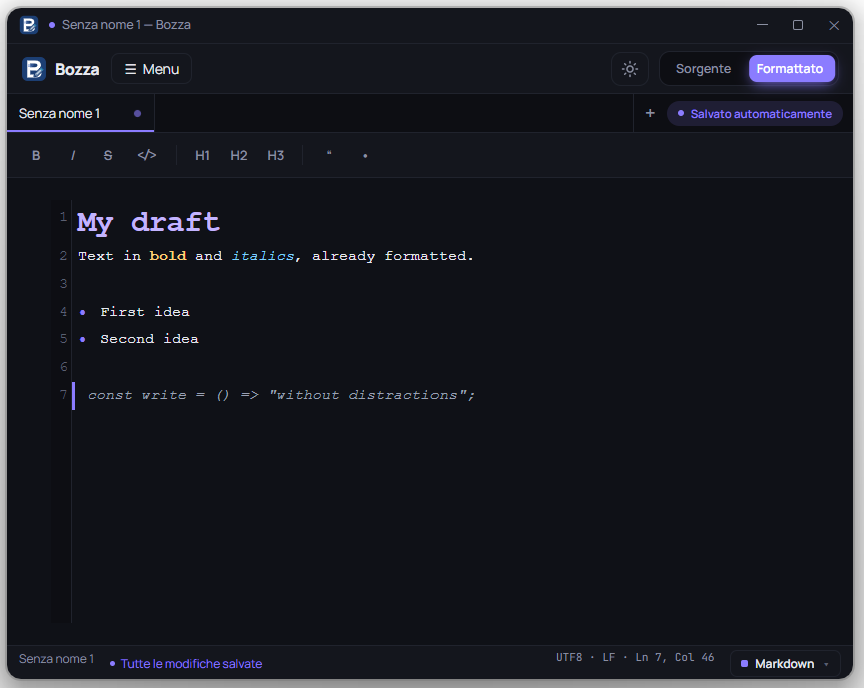
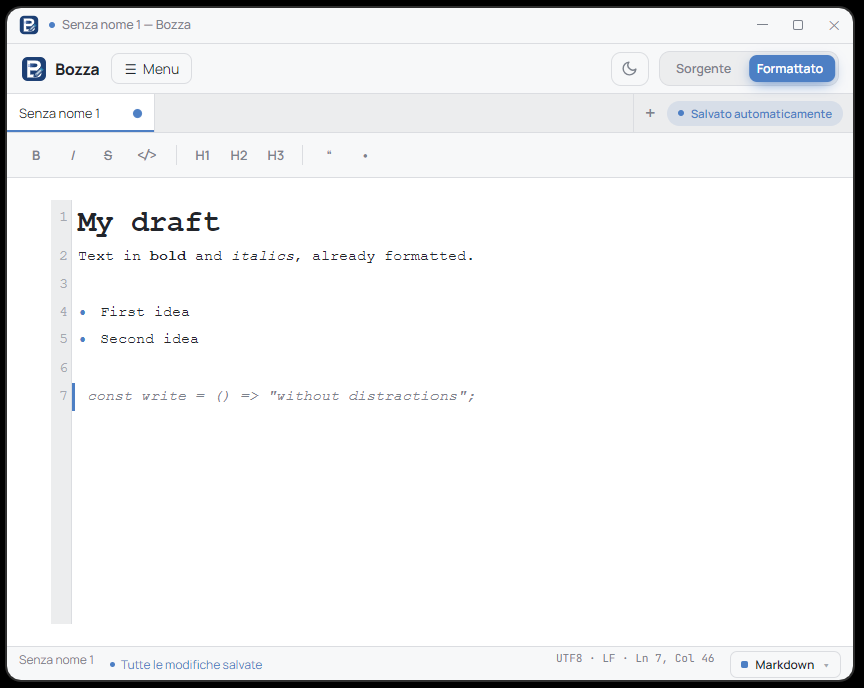
Light and dark themes
Two polished themes to write comfortably at any hour, with syntax highlighting for dozens of languages.
Why I built it
Inspired by Notepad++, with the features I needed
I wanted an editor that showed Markdown already formatted as I wrote, without giving up the speed and privacy of a local notepad. I couldn't find one, so I built it. It turned out nicely, so I made it public. Free, offline, no tracking.